RottenTools Rottentree

Every directory you look after, one level at a time, and nothing written behind your back.

A rotten tree for directories nobody has pruned since 2011.

An LDAP and Active Directory client that reads freely and writes reluctantly. Browse, search, edit, import, check passwords and compare replicas, with every change shown exactly as it will be sent, before anything leaves.

Latest: v1.0 Windows, Linux, macOS. Free software, GPL-3.0-or-later. Packages are hosted on GitHub.

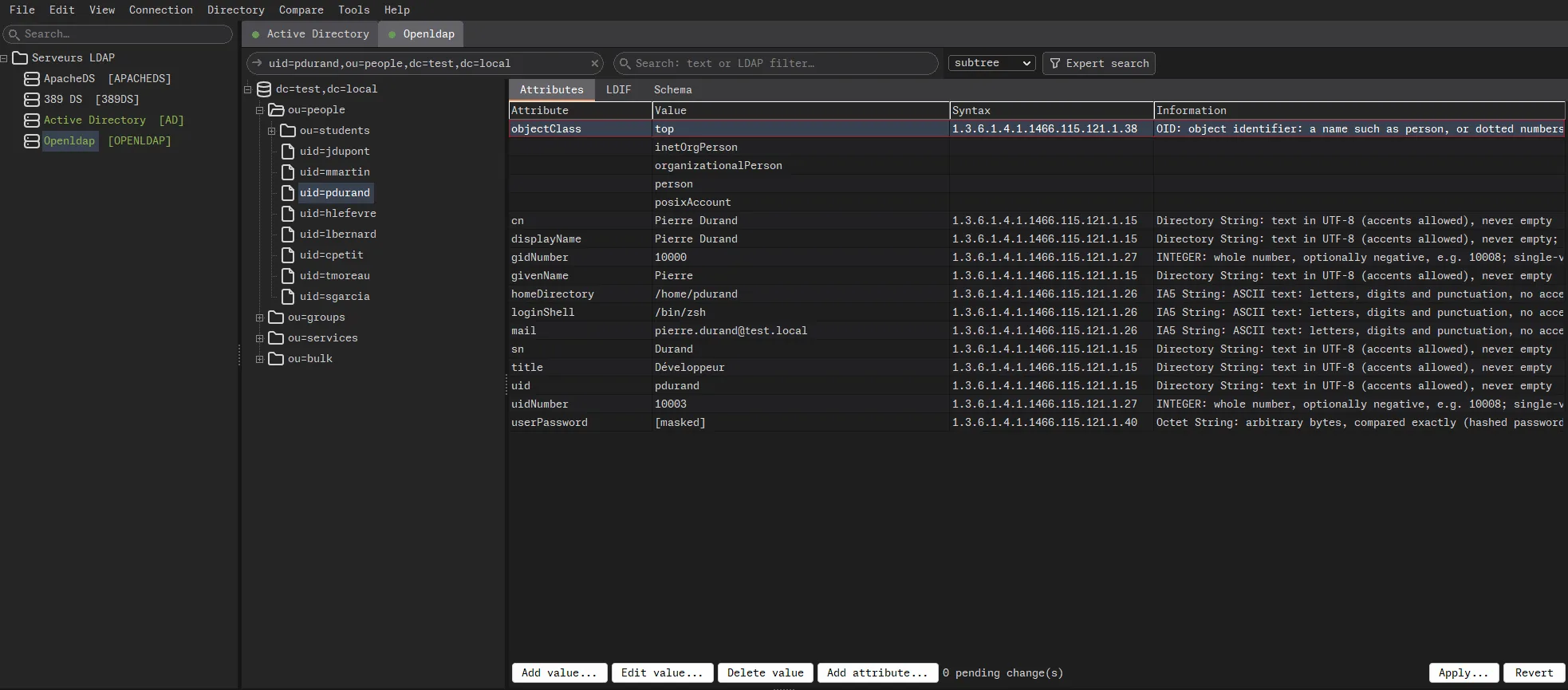
The Rottentree window: connection profiles on the left, each tagged with its server type, one tab per open directory, the tree of an OpenLDAP base in the middle, and on the right the attributes of a user with the syntax of each one explained in plain words. The userPassword value is shown as masked.
Fourteen users. Real directories hold fourteen thousand in a single OU, two of them deceased and three of them still enabled. Note the password, masked until you ask, which is more than most exports can say.

Why this exists

The three things you have already tried

The first needs more memory than the directory it administers, and wants to update its runtime while the domain controller is on fire. The second is a web application, standing between you and every password in the company, exposed to the network so that you can reach it from anywhere, like everybody else can. The third is ldapsearch -x -H ... -D ... -W -b ..., typed from memory, with the shell history keeping the bind DN as a souvenir for whoever gets your laptop next.

Rottentree is a native application. It starts in under a second, it does not want an account, and it talks to nothing but the directories you configured. No telemetry, no "help us improve", no update check phoning home to report that you opened the domain controller again at 3 a.m.

It cannot stop you from doing something stupid. It only makes sure you do it on purpose, having read it first, which is already more than the average Friday afternoon allows.

Connections

Your profiles in one file, and no shortcut through clear text

Every connection profile, folder, saved search and comparison lives in a single encrypted document on your disk. The passwords too, but only the ones you chose to remember.

Locked properly

  • Encrypted with Argon2id and XChaCha20-Poly1305, behind a master password that is slow to guess on purpose.
  • Lose the file on a train and whoever finds it gets a long, warm winter of running their graphics card against it, and nothing else.
  • Forget the master password and you get exactly the same deal. That is the point, and from then on it is also your problem.

Saved properly

  • Saving is atomic: pull the plug mid-save and you get yesterday's version back, not a perfectly encrypted empty file.
  • New profiles are read-only until you say otherwise. Most days you only wanted to look, and looking has never deleted anybody.
  • Profiles can be exported and imported, for the colleague who needs your servers but not your opinions.

Connected properly

  • Plain LDAP, StartTLS or LDAPS, with TLS 1.2 at the very least, and certificates checked for real: chain, dates and host name.
  • A failed TLS negotiation closes the connection. It never quietly retries in clear text, because "it worked" and "your password just crossed the network" look exactly alike until the audit.
  • The lab server's self-signed certificate, the one that expired in 2019 and that everybody clicks through, can be trusted for that profile only, after you have looked at its fingerprint.
  • Anonymous, simple bind, or a client certificate. Append base DN lets you type cn=admin like a person, rather than like a person who has typed dc= four hundred times today.

The tree

Reads freely, writes reluctantly

One level at a time

The tree is read one level at a time, and only when you open it. Nothing loads the whole directory because you clicked on a server, and the server is grateful, in its own silent way.

A level with fifty thousand children, the classic ou=people from which nobody has ever been removed, not even the deceased, is cut into ranges instead of freezing the window and the server's patience at the same time.

The server's own configuration

If your account can read it, the server's configuration appears in the tree too: cn=config, cn=monitor, the Active Directory configuration and schema partitions. Labelled as such, so nobody confuses it with the people.

Any change there comes with a warning that it applies at once and can take the server down with it, and your weekend with the server. The warning is not there to scare you. It is there so that you cannot say nobody told you.

Nothing leaves unseen

Changes wait in a buffer. Apply shows the exact operations before anything is sent: the last moment in the life of a change when it can still be called a draft.

When the server supports it, a write only lands if the entry has not changed since you read it. Otherwise the entry is read again right before, because a colleague editing the same group at the same time is not a theory, it is Tuesday.

Outcome unknown, said out loud

When the connection drops after a request has left, Rottentree says outcome unknown instead of guessing. It never replays a write on its own: a retried delete is a fine way to find out whether the first one worked.

Create, rename, move, copy a branch to another server, or delete a whole subtree, leaves first, after showing you how many entries that actually is. It is always more than you thought.

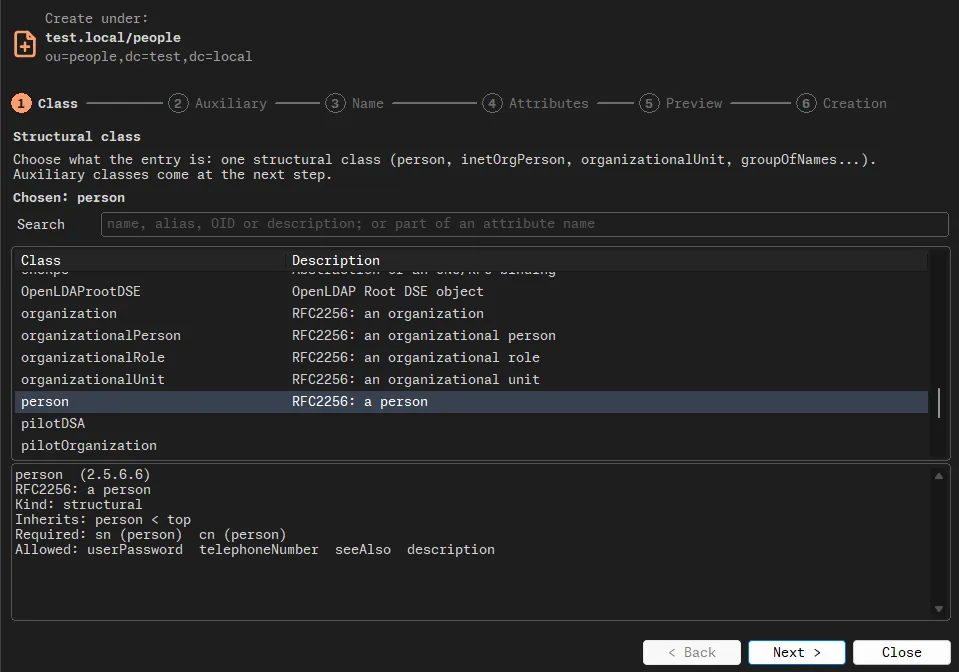
The entry creation wizard, at the first of six steps: choosing the structural class of a new entry under ou=people from a list read from the server's schema, with the inheritance of the selected class and its required and allowed attributes shown below.
Six steps, the fifth of which is called Preview. The classes and their attributes come from the server's own schema, not from what you remember of it at 6 p.m.

Search and LDIF

Finding things, and moving them around

Plain text or an LDAP filter, scope, attributes, paged results and saved searches. And a filter builder, for the evenings when you can no longer remember where the parentheses go in a negation.

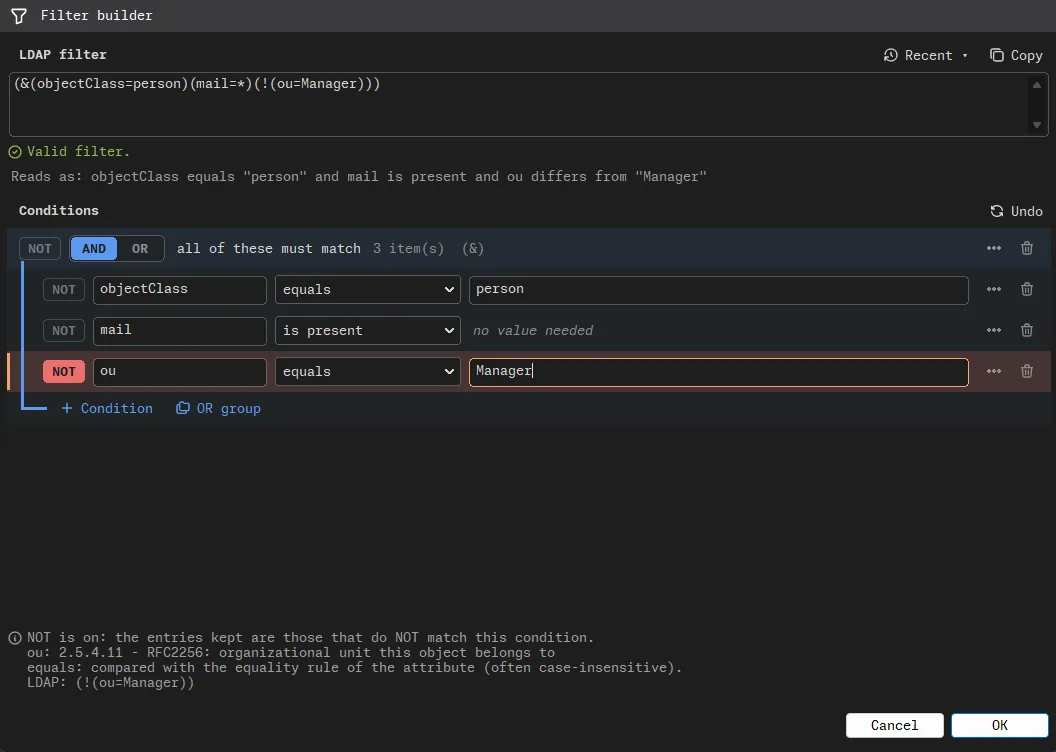
The filter builder: an LDAP filter at the top, checked as valid and read back in plain words, and below it the three conditions it is built from, the last one negated, with an explanation of what the negation keeps.
The filter, read back in plain words. Useful on the day the filter that was supposed to exclude the managers starts selecting only them.

0 results is only shown as such once the server has actually finished answering, not when it hit a size limit and went quiet, which is the moment when 0 results quietly starts meaning "some".

LDIF imports come with a plan you can read before running it, and exports cover an entry, a branch or a search. An LDIF file can also be opened as if it were a server: tree, search, edit, save, and copy branches between the file and a live directory, in both directions.

Useful for checking what a 40 MB export really contains before feeding it to a production server, which would happily accept the first thirty thousand entries and choke on the rest, at 2 a.m., with no way back but the export you did not make.

Passwords

Hashes, read, checked, and never decrypted

Rottentree reads, recognises and checks userPassword values: {SSHA} and its SHA-2 cousins, {CRYPT} with MD5-crypt, SHA-crypt or bcrypt, the PBKDF2 dialects of OpenLDAP and 389 DS, and {ARGON2} as OpenLDAP builds it with libargon2 or with libsodium. Those two builds do not accept the same values, and Rottentree tells you which one will choke on which, before the user finds out at login.

It flags the values still sitting on a fast, unsalted or weak digest, so you know exactly which accounts to worry about, and roughly since which decade. It generates new values, and the copy button clears the clipboard after thirty seconds, because a password left in a clipboard is a password pasted into the wrong chat window.

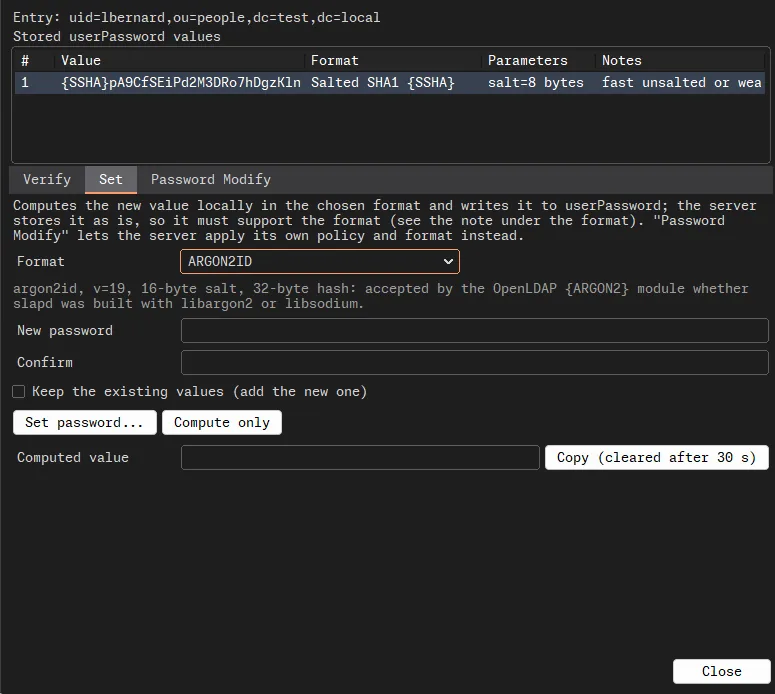
The password tools for one entry: the stored userPassword value identified as salted SHA-1 and noted as a fast, unsalted or weak digest, and the Set tab preparing a new Argon2id value accepted by both OpenLDAP builds, with a copy button cleared after 30 seconds.
A salted SHA-1, diagnosed. Its replacement in Argon2id, explained. The copy button, on a thirty-second timer, like a bomb in a film but more useful.

Active Directory

The domain, without the console you have to remote into

A domain dashboard, the default and fine-grained password policies, and account states (disabled, locked out, must change password, never expires) changed without touching the unrelated bits of userAccountControl, so that unlocking an intern does not also turn them into a domain controller.

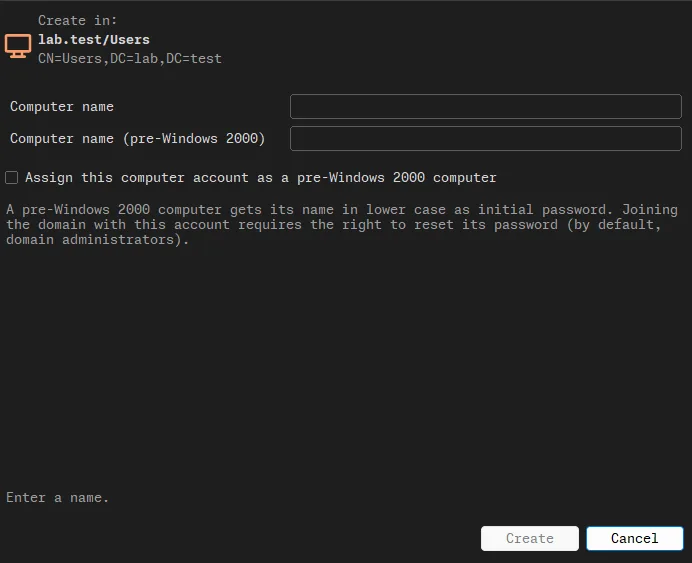
User, group and computer creation. Protection against accidental deletion, set the same way the Microsoft console sets it. Security descriptors rendered for humans. And per-attribute replication metadata, for the afternoon two domain controllers disagree about who someone is, and both are absolutely certain.

The Active Directory computer creation dialog: the target container shown both as a readable path and as a DN, fields for the computer name and its pre-Windows 2000 name, and an explanation of what the pre-Windows 2000 option does to the initial password.
A computer account, with the pre-Windows 2000 option explained before you tick it: the initial password is the name, in lower case. Security from 1999, still available today.

Replicas

Sixteen servers that agree, roughly as often as an eclipse

Comparison

From 2 to 16 directories or LDIF files, compared entry by entry, with the differences sorted, explained and exported as HTML, JSON or CSV. Sixteen replicas in perfect agreement is a beautiful sight, and you will see it about as often as an eclipse.

The CSV export neutralises cells a spreadsheet would execute as formulas. A description starting with = is a joke the first time and an incident the second.

Monitoring

cn=monitor counters and 389 DS replication agreements, refreshed only while you are looking at them, so nobody's server spends the night answering a window minimised since lunch.

A counter that cannot be read shows as unknown, never as zero. Zero errors and no idea are not the same statement, however much the weekly report would prefer the first one.

Also in the box: a schema browser, a Root DSE inspector (what the server actually supports, as opposed to what the slide deck said), a certificate inspector, and DN and filter escaping for the colleague called O'Brien. Tested against OpenLDAP, 389 Directory Server, ApacheDS and Active Directory, each of which reads the RFCs with the same creativity and none of the same conclusions.

Platforms

Windows, Linux and macOS

The same application on all three, built automatically from the repository rather than on somebody's laptop at the end of a long week.

Packages published for Rottentree on each supported platform, with the architecture built and the warning each operating system will show.
Platform Package Built for What to expect
Windows Installer, inside a ZIP x64 Not signed, so Windows calls the publisher unknown. More info, then Run anyway. The directory libraries travel with it.
Linux Debian and Ubuntu package amd64 Uses the distribution's own LDAP, TLS and GTK3 libraries, declared as dependencies, so the package manager does the fetching.
macOS Disk image, drag to Applications Apple Silicon (arm64) Gatekeeper blocks the first launch. Open it once, let it be refused, then Privacy and Security, Open Anyway.

Two of the three will therefore tell you this software is not to be trusted, and they have a point: you are about to hand the keys of your directory to a program written by a stranger. Read the source first. Nobody does, but it is there.

Download

Get Rottentree

Latest: v1.0 Windows, Linux, macOS. Free software, GPL-3.0-or-later. Packages are hosted on GitHub.

The button goes to the releases page, which always shows the current version. This site does not host the files.

Source and license

It stands on the shoulders of the OpenLDAP libraries, OpenSSL, Cyrus SASL, libsodium, SQLite and Argon2, each listed with its licence. Those people did the hard part. The bugs are probably mine. (c) 2023-2026 Cyril LAMY.

Questions

The ones people actually ask

Can it break my directory?
Not by accident. New profiles are read-only until you change that, browsing writes nothing, and every change is shown exactly as it will be sent before anything leaves. It will still let you delete an OU on purpose. It just makes sure it is on purpose.
Which servers does it work with?
It is tested against OpenLDAP, 389 Directory Server, ApacheDS and Active Directory. An LDIF file can also be opened as if it were a server, with its own tree, search and editing.
Where are my connection passwords stored?
Nowhere, unless you ask. Those you choose to remember go into a single encrypted document on your disk, with your profiles, folders and saved searches, behind a master password that is deliberately slow to guess. There is no account and no sync service.
Can it recover a user's password?
No. A stored password is a hash, and there is nothing to decrypt. Rottentree reads the format, checks a candidate password against it, tells you whether the format is weak, and generates new values. Recovery is not a feature, it is a different job.
What happens if the connection drops in the middle of a change?
Rottentree says the outcome is unknown, because it is. It never replays the change on its own, since replaying a delete is a fine way to find out whether the first one worked. Read the entry again and decide.
Will Windows or macOS complain when I install it?
Yes. Nobody has paid a certificate authority to vouch for it, so Windows calls the publisher unknown and macOS blocks the first launch. Both warnings are accurate, and neither is a verdict on the software.