RottenTools RottenText

A text editor that already has the tool you were about to paste into a website.

A rotten editor for rotten files and rotten days.

Small, fast, and carrying a toolbox. The fiddly conversions you would otherwise hand to a stranger's web page happen on your own machine instead, in the same window as the file you were already editing.

Latest: v1.9 Windows, Linux, macOS. Free software, GPL-2.0. Packages are hosted on GitHub.

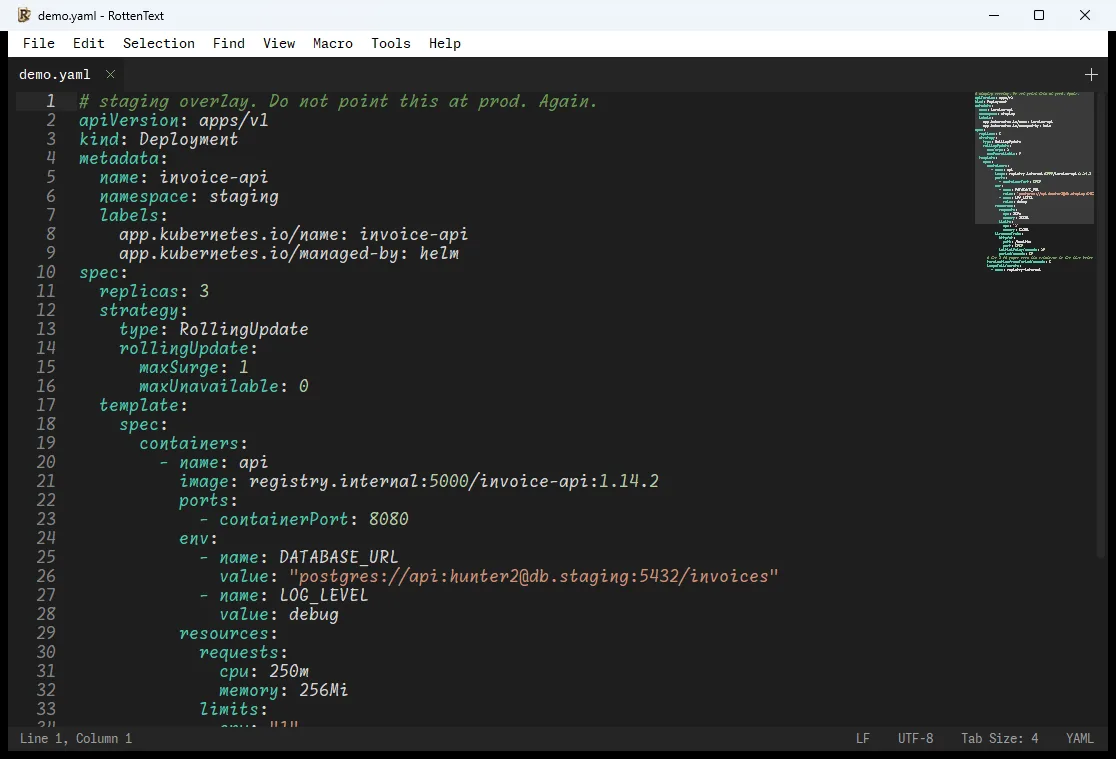
The RottenText window showing demo.yaml, a Kubernetes Deployment manifest, with syntax highlighting, line numbers, a minimap on the right, and a status bar reporting LF line endings, UTF-8 and the YAML grammar.
Line endings, encoding, detected language. The three small things in the status bar that quietly ruin a file.

Why this exists

The tab you keep reopening

You know the one. It decodes a scrambled string for free, it asks for nothing, and the domain was registered eleven months ago by somebody whose privacy service is doing an excellent job. You paste in a line lifted from a live system, you get your answer, you move on. There is an outage open and nobody has the appetite for a principled stand at half past two in the morning.

That is the whole origin story. RottenText is a plain, fast editor with the small tools built into it, so the string never goes anywhere. The editor half opens files and stays out of the way. The Tools menu is the reason the thing exists.

None of those jobs are hard. Unscrambling a value is not hard. Working out whether one address sits inside a range is not hard. Reading a certificate is not hard. They are small, they come up constantly, and they get done under precisely the conditions in which people make careless mistakes.

In practice

Three ordinary afternoons

A password arrives in a ticket

Somebody pastes a configuration file into a ticket and asks why the application will not start. Its passwords are scrambled, which looks like encryption and is not. You need to read one line, change it, put it back, and be certain you changed nothing else.

Paste it in. Decode Secret opens it readable in a new tab. Fix the value, rebuild the file, then Diff vs File against the original to confirm that exactly one line moved. Nothing left the machine, and nothing went through a stranger's web form on the way.

A certificate, five minutes before the window

A colleague hands over a file and says it is the new certificate. Nobody is quite sure which addresses it covers, when it expires, or whether it is the one that was reissued last month.

Open it, run Inspect File, read the answer: who issued it, who it is for, when it dies, which names it actually covers, and whether it was signed with something that stopped being respectable a decade ago. No command to remember, no argument about which version of which tool is on the machine.

Forty thousand lines, one real question

The log file is enormous. The question is small: which machine keeps doing this, and since when.

Extract and Count pulls out every address, deduplicated, with a tally. Twelve of them matter. Summary gives the shape of the file, and Deltas Between Timestamps finds the eight seconds where everything went sideways. If the other log matters too, Merge with File interleaves the two by time.

The toolbox

What is in the Tools menu

Grouped the way you would actually reach for them. Anything that produces a report opens it in a new tab, so it never overwrites the file you were reading.

Scramble, unscramble, escape

The submenu you will use forty times a day and never think about again.

  • Base64, URL, HTML entities and hex, each way, on the selection or the current line.
  • Decoding refuses to quietly swallow garbage. Half your text does not vanish for you to discover in production.
  • Quote a value correctly for Bash, PowerShell, JSON, YAML, SQL, sed, systemd or nginx. Because the deploy failed over one apostrophe, in a password, inside four nested layers, and you were never going to get all four right by hand at midnight.
  • Everything acts on what you selected, or the line you are on. Never on the whole file by surprise.

Fingerprints and signatures

  • MD5, SHA-1, SHA-256 and SHA-512, of a selection or of a whole file.
  • The SHA-2 code is hand-written rather than borrowed, and checked against the official test vectors. You will never verify that, but it is true.
  • Checksum lines in the exact format the usual verification command expects, so the "please confirm the download arrived intact" ritual takes one click.
  • Signature codes for webhooks, with the secret typed into a masked field that is never shown, inserted, logged, or kept afterwards.

Passwords and identifiers

  • Passwords, unique identifiers, tokens and API keys, from the operating system's own source of randomness. If it cannot produce real randomness it refuses, rather than handing you something guessable.
  • Web server password entries, using a modern scheme by default. The old compatible option is a trap, and it is labelled as one.
  • Directory server passwords in every format those servers accept, including Argon2 in both of the cost settings the two common builds use, because picking the wrong one produces an entry that silently never matches.
  • Ready-made directory entries for a domain, a department, a person, a group and a service account. For when the directory is down and, like a good sysadmin, your backup situation is theoretical.

Configuration files

The "why is this not loading" family.

  • JSON, XML, YAML, INI and TOML: check them, tidy them, sort them, and get told which line is wrong rather than that something, somewhere, is.
  • Find the duplicate setting. The second one wins silently, and it is never the one you meant, which is why your change did nothing.
  • Compare two configuration files key by key: only here, only there, different. For "the settings on the test machine and the live one are definitely identical". They are not.
  • Terraform and Helm helpers, including a cross-check of what a template uses against what is actually defined. Secret values are blanked out before they can reach a file you are about to commit. Yes, into the repository. Yes, that public one.
  • XML refuses booby-trapped documents before it starts reading them, rather than freezing while a three-line file expands into a gigabyte.

Containers and environments

  • Build or read back Kubernetes secrets and settings without the four-step incantation you look up every single time.
  • Docker Compose and Podman: list the images in use, pull the settings out, change a version tag without eating the # pinned by security comment sitting next to it.
  • Environment files: sort, tidy, deduplicate, convert to and from other formats.
  • Blank out the passwords, including the ones buried inside connection strings, before the file goes into a ticket for the vendor to look at.

Addresses and time

  • Work out what a network range actually contains: first address, last address, how many, and whether the one you are arguing about is inside it. Settles the question before somebody firewalls the wrong machine.
  • Turn any of the four timestamp formats you meet in logs into a readable date, with the gap between the first and the last. Select two lines, learn how long the outage really was, cry accordingly.
  • Conversions use the clock offset that applied on that date, not today's. A July log read in January comes out in July, which sounds obvious and is what almost nothing else does.
  • Explain a scheduled task in plain English and show the next few times it will run. For the cryptic line you copied from somewhere and have never once been fully sure about.
  • Build a port scan command from a dialog. It builds the command. It does not run it. Whether you are allowed to is between you and whoever owns the target.
  • Ready-made snippets to poke a service by hand, for about thirty protocols, so you can prove the problem is not your side before anyone asks.

Read it before it ruins your evening

  • Certificate reader written from scratch: who issued it, who it covers, when it expires, how strong it is, and a flag on anything weak. Mostly you will use it to find out when something expired, three days after it did.
  • Login token reader, showing when it was issued and when it dies, with a loud note at the top that it cannot tell you whether the token is genuine. Nobody should quote it as proof in an incident report.
  • Email trace: paste in the headers of a message and get its journey rebuilt, one box per server it crossed, with how long it waited at each. Answers "where did this sleep for four hours" and "which route did this spam take".
  • Permissions both directions, and a calculator for the setting that decides what new files get. Because it is subtraction that is not subtraction and everyone needs reassurance.

Logs and ugly text

For the file you are staring at while the incident is still open.

  • Rewrite every timestamp into one format, then sort by time even when the file mixes three of them. Lines without a stamp stay with the line above, so a stack trace follows its own error.
  • Merge two logs by time, even unsorted. The application log and the proxy log, in one tab, in order, finally telling the same story.
  • Prefix every line with the gap since the previous one. Negative when the log went backwards, which it will.
  • A summary: how many lines, over what period, how many of each severity, the top errors, the top addresses.
  • Pull out and count addresses, links, email addresses and identifiers. The scanners are hand-written and linear, so a hundred megabyte file does not bring the whole thing down.
  • A live side-by-side comparison against another file. The left side stays editable, the highlight goes out as you fix each line, and on close it offers to fold your edits back in.

The manual documents every one of these and is honest about where each stops working, which is more than most manuals manage. Read the manual.

Binary files

When the file is not text at all

Sooner or later something hands you a file that is not words. A firmware image, a database page, a document that a transfer mangled somewhere between two machines.

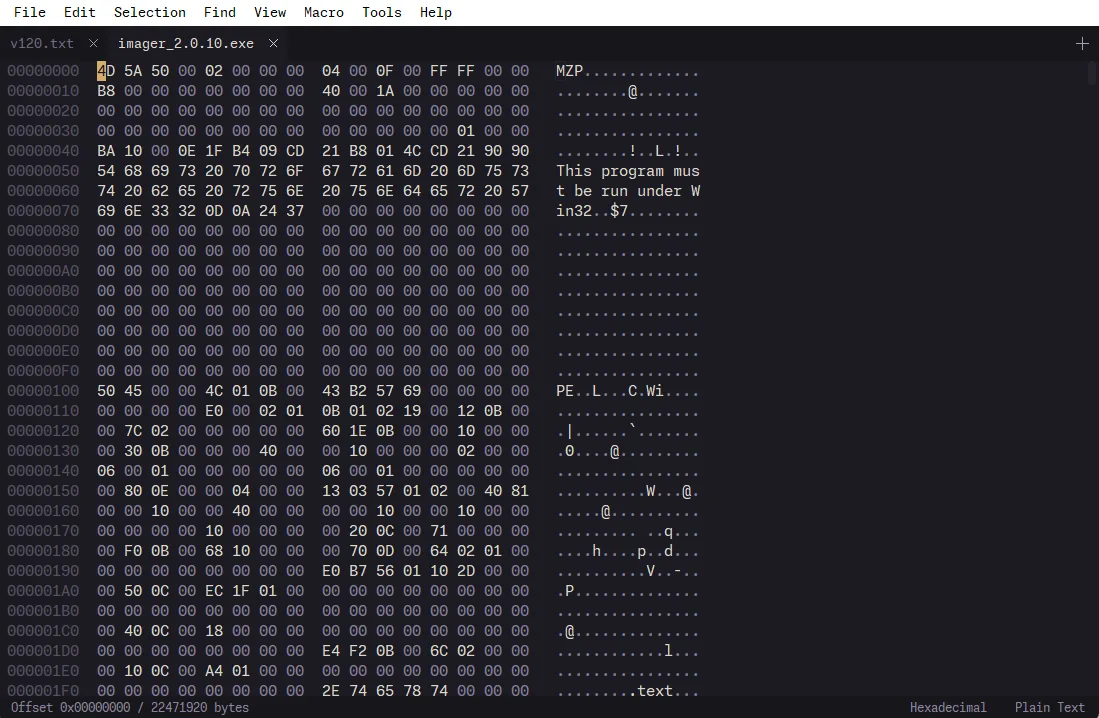
The RottenText hex editor open on a Windows executable: file offsets down the left, the raw bytes in the middle, the readable characters on the right, and a status bar reading offset zero of 22471920 bytes.
A 22 MB executable, in a tab next to a text file. The readable column on the right is usually where you find what you came for.

RottenText opens it as a grid of bytes, with the position down the left, the raw values in the middle, and anything readable spelled out on the right. That right-hand column is where you normally find what you came for: a version string, a hostname somebody hard-coded, the word that proves this is not the file it claims to be.

It opens binary files by itself when it recognises one, so you never get the screenful of noise that used to mean you had just corrupted something by opening it. Large files load immediately, because it reads the part you are looking at rather than the whole thing.

You can also change bytes, which is where most tools start being careless and this one starts being paranoid.

  • Search for bytes either as raw values or as readable text, whichever you happen to have.
  • Jump straight to a position when the documentation tells you the interesting part starts there.
  • Edits are written in place, so the file keeps its size and its structure stays valid.
  • If a write fails halfway, it says the file now mixes old and new bytes and tells you to reload it. It does not say Saved and let you find out later.
  • Save a copy instead, when you would rather keep the original and you are right to.
  • Copying a selection has a size limit, so a stray Ctrl+A on a two gigabyte file does not take the window with it.

The editor

The boring half, kept deliberately boring

It opens files. It has no opinion about your indentation and it will not offer to restructure anything. The one thing it genuinely cares about is not damaging what you opened.

Saving never empties the file first and then writes it back, the way almost everything does. Lose power halfway through and you still have yesterday's file, whole, instead of a fascinating new mix of both. Links are followed properly, so saving through one does not quietly replace it with a real file and break whatever pointed at it.

Line endings are remembered per file and preserved on save, so opening something from a Linux server on a Windows machine does not hand you a comparison with twelve thousand changes and zero actual changes. Convert tabs to spaces and it lines up to the next stop rather than blindly dropping four, so your columns hold. Try it on a Makefile and it asks first, because that file needs real tabs and converting them would break it silently. That is the kind of detail you learn exactly once.

  • Tabs, split view and a minimap. A dot instead of a cross means unsaved. A padlock means the file is read-only and your sudo is somewhere else.
  • Find and replace with a live count in the status bar, so you know how many places you are about to change at once.
  • Word wrap, with a column you choose, for the config file somebody wrote as one 400 character line.
  • Show invisibles, for the day the problem turns out to be a trailing space.
  • Selecting text copies it, the way terminals do. Middle-click pastes. On Linux the selection is shared with everything else on the desktop.
  • Sort lines, change case, comment and uncomment a block, indent and unindent, paste with the surrounding indentation already fixed.
  • Dozens of text encodings, detected on open, with a way to reopen when the guess is wrong on that one file from the 2003 server nobody will let you decommission.
  • Colouring for 40 languages. Very large files skip it on purpose: prettifying a 156 MB log is not a feature, it is a denial of service against yourself.
  • 18 themes and a choice of six built-in typefaces. The program carries its own fonts and does not care what is installed on the machine.
  • A folder sidebar that notices when a build churns the directory under you, and refreshes.
  • Record a sequence of edits and replay it, for the day the same change has to happen on 300 lines and copy-paste has failed you spiritually.
  • A search box over every menu command, because your memory has no room left for keyboard shortcuts.
  • It reopens what you had, including unsaved scratch notes, so the tab where you were drafting the incident timeline survives you closing the window by reflex at the end of a fourteen hour shift.
  • Printing with colours, on white paper, for the auditor who wants a hard copy of the firewall rules and means it.

Local processing

Nothing you type leaves the machine

Every tool runs inside the program. No network call, no cloud half, no account, and no optional cloud feature that becomes mandatory in version three. Half the jobs in that menu are things people habitually do by pasting sensitive data into a random web page, and then look surprised about afterwards.

Where a tool needs a password, the field is masked and the value is never shown, inserted, logged or copied. It is wiped from memory when the tool is done. That is not something to be proud of. It is the minimum bar, and the fact that it is worth writing down says more about whatever you were using last week than about this.

It is not a security product and it has not been audited. The licence disclaims warranty at length and in capital letters. What it does mean is narrow and useful: the thing you decoded was decoded here.

Platforms

Windows, Linux and macOS

Same editor, same toolbox, same regrets, three operating systems.

Packages published for RottenText on each supported platform, with the architecture built and the warning each operating system will show.
Platform Package Built for What to expect
Windows Installer, inside a ZIP x64 Nobody has paid to have it signed, so Windows calls the publisher unknown and hides Run anyway behind More info.
Linux Debian and Ubuntu package amd64 An Arch recipe lives in the repository. It is unsupported, and the repository says so itself.
macOS Disk image, drag to Applications Apple Silicon (arm64) Gatekeeper blocks the first launch. Open it once, let it be refused, then System Settings, Privacy and Security, Open Anyway.

Two of the three will therefore tell you this software is not to be trusted. Both are working exactly as designed, neither is lying, and neither has looked at the code. They are telling you nobody paid a certificate authority. That is all they can ever tell you.

Download

Get RottenText

Latest: v1.9 Windows, Linux, macOS. Free software, GPL-2.0. Packages are hosted on GitHub.

The button goes to the releases page, which always shows the current version. This site does not host the files and has no interest in starting.

Source and license

The program carries its own typefaces, which is why the font licences travel with every package. Everything else that ends up in a build is listed with its licence and what a redistributor has to do about it. (c) 2026 Cyril LAMY.

Questions

The ones people actually ask

Is it actually rotten?
Rotten name, real tools. The hashing is hand-written and checked against the official test vectors, the certificate reader was written from scratch, and saving a file cannot leave you with half of one. The name was chosen by one person, late, without review, and it is the only part of this that shipped untested. It shows. That was the idea.
Is this a code editor?
No. There is no plugin marketplace, no language server, no AI completion. If you write software for a living you will want something else. The editor is there to hold the toolbox open.
Does anything get uploaded?
No. Every tool runs inside the program, on your machine. There is no telemetry, no usage statistics and no phone-home, and the fields where you type a password never show, insert, log or copy what you typed.
Why is there no regex in find and replace?
Deliberate. Find and replace has case sensitivity, whole word, in-selection and a live match counter, so you can see how many places you are about to change at once. If you want pattern matching across a whole tree, you want a different tool and probably a change ticket.
Will Windows or macOS complain when I run it?
Yes, and they are right to. Nobody has paid a certificate authority to vouch for this program, so Windows calls the publisher unknown and macOS blocks the first launch. Both warnings are accurate. Neither is a verdict on the software.
What does it cost?
Nothing, now or later. It is free software on a GitHub releases page. No licence key, no trial, no paid tier, nothing to log into.