RottenTools RottenSSHrimp

One tree of machines, one tab per session, one encrypted file behind it all.

A rotten approach to remote administration.

Every machine you look after, in one window. Terminals, remote desktops, file transfer and tunnels, with your passwords and keys in a single encrypted file that never leaves your disk.

Latest: v2.0 Windows, Linux, macOS. Free software, GPL-3.0-or-later. Packages are hosted on GitHub.

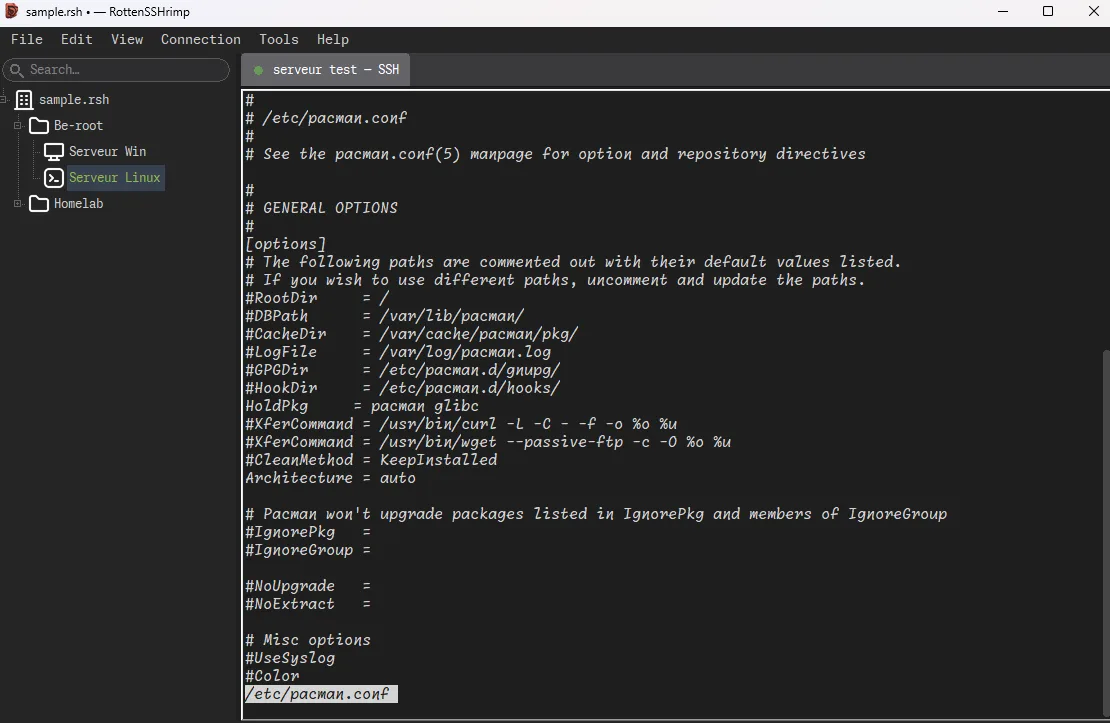
The RottenSSHrimp window: a searchable tree of machines on the left, grouped in folders, and a terminal session on the right reading a configuration file.
One document, one tree, one tab per session. The search box at the top left is what happens somewhere around the fortieth machine.

Why this exists

The three things you have already tried

The first wants a subscription, an account, and a monthly reminder that your infrastructure has quietly become somebody else's recurring revenue. The second ships three hundred megabytes of web browser so a terminal can have rounded corners. The third is a text file called servers.txt, open on your second monitor since 2019, which at least has the decency not to pretend.

RottenSSHrimp is a real application. It starts in under a second, it does not want your email address, and it sends nothing anywhere except the connections you asked for. No tracking, no "help us improve", no update check phoning home to mention that you launched it at 3 a.m. again.

Rotten name, real tools. The name is the only part of this that never went through review, and it shows. Underneath is the kind of caution you usually only find in people who once restored production from a backup that turned out to be empty.

One file

Everything in one place, and that place is yours

Every machine, every password, every key lives in a single file on your disk. You choose where it sits and who backs it up.

Locked properly

  • Modern encryption, behind a master password that is slow to guess on purpose.
  • Lose the file on a USB stick and whoever finds it can heat their office with graphics cards for a few centuries and still read nothing.
  • Lock it mid-session and the key is wiped from memory. Sessions can stay open or close with it, your choice.

Saved properly

  • A power cut halfway through a save gives you yesterday's file back, whole, rather than a very secure pile of nothing.
  • An integrity check you can run whenever you want reassurance.
  • If the program dies badly it offers to save what it recovered, under a new name, instead of quietly overwriting the good copy.

Organised properly

  • Folders, icons, a search box, and passwords shared by a whole folder so the eleven machines with the same account are set up once.
  • Favourites and a recent list, for the six machines you actually touch this week.
  • A dashboard that answers "which of these are actually up" before the meeting where you were going to claim they all were.
  • Confidential mode blanks out the machine names, for screen sharing with people who do not need your inventory.

Sessions

Sixteen machines, one keyboard, your choice of aim

Everything as a tab

Terminals, remote desktops and a local shell, all in the same window, all as tabs. No second application, no separate window manager of your own invention, no wondering which of the nine windows on screen is the production database.

Open up to sixteen at once and arrange them side by side, then either watch them all while typing at one, or type into all of them at the same time. Because sometimes twelve machines need the same mistake made on all of them simultaneously.

Is that still the same server?

Every machine is recognised by its fingerprint, and one that suddenly looks different stops you cold before you type anything.

Which matters more than it sounds. "Somebody reinstalled it" and "somebody is listening in" look exactly alike, right up until the second one reads your password. The program will not guess which it is. It will make you decide, on purpose, while you are still sober.

Ping, without the editorialising

A tab that answers one question: is it coming back, and since when. No administrator rights needed, on any of the three systems.

It says no reply, never down, because half the healthy machines on earth have been quietly ignoring ping since a security review in 2018 and it would be rude to accuse them. Mostly you will use it for the ninety seconds after a reboot you started yourself, during which the honest option is to watch a graph and the alternative is to retry the connection every four seconds and call it diagnostics.

Copy and paste that works

Text and files move in and out of remote desktops, both directions, without a shared folder you will forget to unshare.

Anything arriving from a server is handled like a parcel that ticks: size-limited, opened in a private folder, and never allowed to wander off somewhere else on your disk. In terminals the middle mouse button pastes, as Unix has insisted since before most of us were born.

File transfer

Two panels, and nothing lost on the way

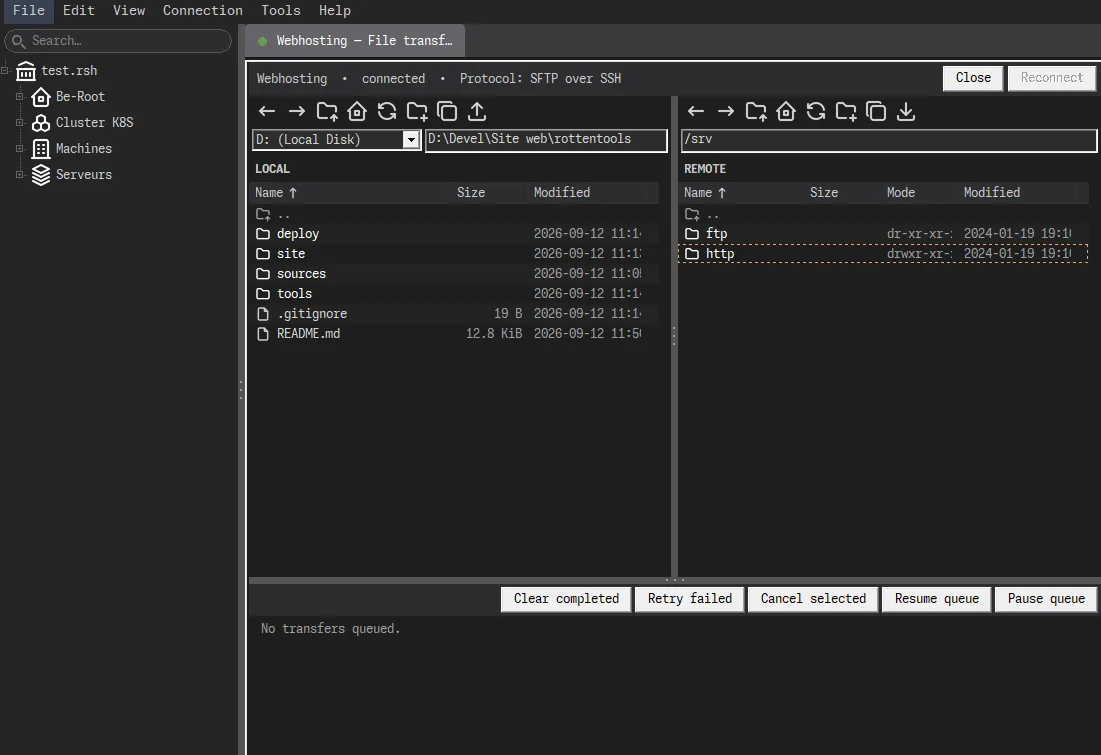
Your files on the left, the server's on the right. The layout every file manager has used since 1986, because nobody has improved on it without also adding a cloud.

The RottenSSHrimp file transfer tab: local files on the left, the server's files on the right, a toolbar above each, and a transfer queue along the bottom with buttons to retry, cancel, pause and resume.
Same window, same tree, another tab. The queue along the bottom is the part that matters when the link is bad.

It opens as a tab on a machine you are already connected to, so there is no second password prompt and no second tool to keep configured. Drag things across, or queue up a folder and go and do something else.

The interesting part is what happens when the link is bad, because that is the only time a file transfer is worth talking about. A complete file is never replaced by half of one. Pull the cable mid-download and the old file is still sitting there, intact and faintly smug, while the incomplete piece waits separately. Reconnect picks up where it stopped.

Shortcuts are never followed, so one pointing at the whole disk stays a shortcut instead of becoming the afternoon you copied everything. Double-clicking opens folders and only folders, so nothing launches because you were in a hurry. And when a transfer fails it says what failed, instead of Completed.

Getting in

Machines that cannot be reached from your desk

Stepping stones

Any machine can serve as the way in to the ones hidden behind it, and that includes remote desktops, not just terminals. The one in the isolated corner of the network has no route to your desk and never will. The machine in front of it does, and that is enough.

Ideal for the afternoon you have to repair the VPN that everyone, yourself very much included, was connected through until eleven minutes ago. Or the firewall rule you tested thoroughly, from the wrong side. Every step is checked like the first one, so a stepping stone that changed overnight stops you there rather than later.

Tunnels

Reach the things only the server can see: the database that listens on itself, the admin page nobody exposed, the queue nobody wants on the internet. The tunnel opens with the terminal and dies with it, so you cannot leave one open for three weeks and find out during an audit.

It answers to your machine alone. A tunnel open to the whole office network is a door into somebody else's network, propped open by you, and the incident report will spell your name correctly.

Keys

Passwords, keys, and the one you can lose

Passwords and keys, including keys the program creates for you, replaces when they get old, and installs on the server itself so you do not have to remember how. Keys are never written to disk unencrypted, which is the absolute floor of decency and yet somehow remains a selling point.

Or no stored key at all. A hardware security key, a YubiKey for instance, can hold your login instead of the file, and asks for a touch every time you connect. The secret is created on the device and never leaves it. Whoever steals your file and your master password gets an excellent inventory of your infrastructure and no way into anything.

Same device, same file, on all three operating systems. On Windows the prompt is the system's own, so nothing asks for administrator rights.

Containers

When the problem is inside the cluster

Docker containers, Podman containers and Kubernetes pods open as terminal tabs like anything else in the tree. They sit next to the machines they run on, which is where you were looking for them anyway.

The alternative is typing the right command from memory at 2 a.m., getting one flag in the wrong place, and running it against the environment you switched to forty minutes ago for something completely unrelated. That has never once gone well.

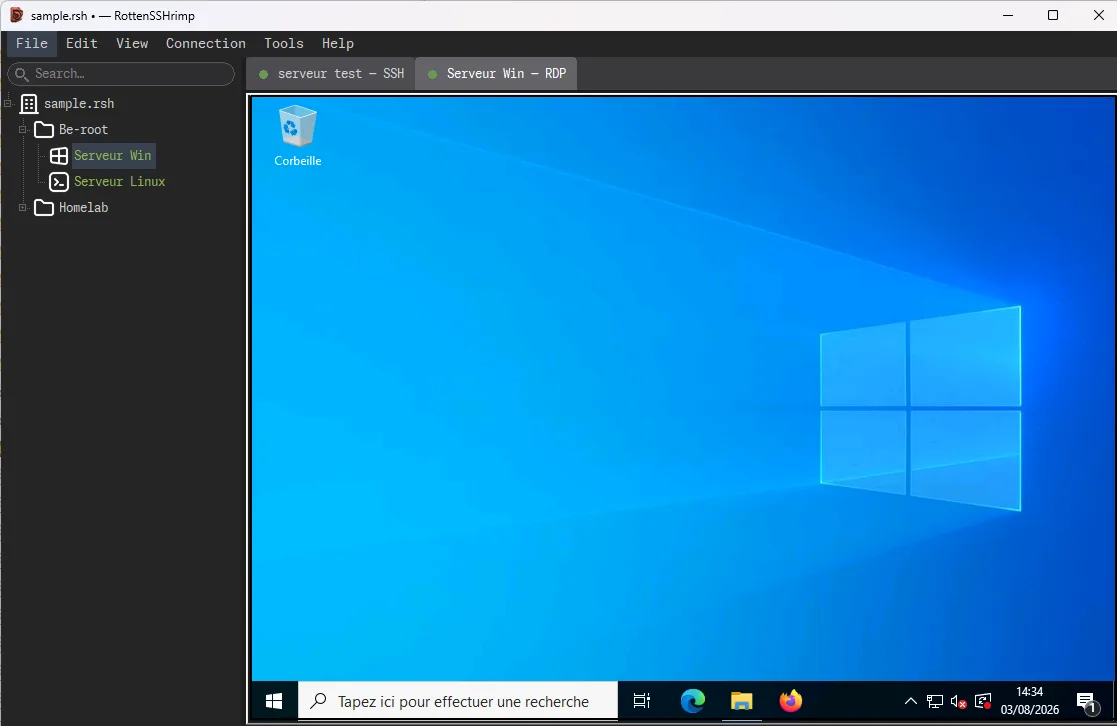
The same RottenSSHrimp window with a second tab open: a remote Windows desktop, sitting next to the terminal tab in the same bar.
Same window, same tree, same tab bar. Whether it is a terminal or a whole desktop is a detail.

Local storage

Your inventory is not a product

There is no account to create, no workspace to join and no seat to pay for. It will not sync your keys to a cloud where they can be conveniently available during somebody else's breach. It does not report what you connected to, when, or how often, because it does not report anything.

Bring your existing configuration in, a spreadsheet of machines, or an export from another copy. Export one folder to hand a colleague exactly the six machines they need, which is about forty fewer than the last person who pasted everything into a chat window.

None of that makes it secure in the absolute sense, and it is not offered as such. It has not been audited. The licence disclaims warranty at some length and in capital letters. What it means is narrower and more useful: the list of your machines is on your machine.

Platforms

Windows, Linux and macOS

The same application on all three, built automatically from the repository rather than on somebody's laptop at 2 a.m.

Packages published for RottenSSHrimp on each supported platform, with the architecture built and the warning each operating system will show.
Platform Package Built for What to expect
Windows Installer, inside a ZIP x64 Not signed, so Windows calls the publisher unknown. More info, then Run anyway.
Linux Debian and Ubuntu package, or a tarball amd64 The tarball installs without administrator rights. An Arch recipe is in the repository, unsupported, and it says so.
macOS Disk image, drag to Applications Apple Silicon (arm64) Gatekeeper blocks the first launch and offers Move to Trash as the helpful default. Open it once, let it be refused, then Privacy and Security, Open Anyway.

Two of the three will therefore tell you this software is not to be trusted. Both are working exactly as designed, and neither is lying. What they are telling you is that nobody paid a certificate authority. It is a statement about invoices, not about the code, and neither system has read a line of it.

Download

Get RottenSSHrimp

Latest: v2.0 Windows, Linux, macOS. Free software, GPL-3.0-or-later. Packages are hosted on GitHub.

The button goes to the releases page, which always shows the current version. This site does not host the files.

Source and license

It stands on the shoulders of a dozen other free projects, each listed with its licence and what a redistributor has to do about it. (c) 2025-2026 Cyril LAMY.

Questions

The ones people actually ask

Is it actually rotten?
The name, enthusiastically. The rest, no. Your file survives a power cut mid-save. A half-finished download never replaces a good one. The program notices when a server stops being the server it was yesterday. The rot is stored entirely in the branding, in a sealed container, at room temperature, where it cannot reach anything important.
Is this just a list of saved connections?
No. Terminals, remote desktops, file transfer and tunnels share one window. Any machine can act as a stepping stone to the ones hidden behind it. Containers and Kubernetes pods open as tabs like anything else, and everything sits in a single encrypted file.
Where are my passwords and keys stored?
In one encrypted file on your disk, locked with a master password that is deliberately slow to guess. There is no account and no sync service. Keys are never written to disk unencrypted, and a hardware security key stores only a handle, never the secret itself.
What happens if the connection drops during a file transfer?
The good file is still there, untouched, and the partial one is kept separately. Reconnect and the queue picks up where it stopped. A complete file is never replaced by half of one.
Do I need administrator rights for the ping tab?
No, on any of the three systems. It reports no reply rather than down, because half the healthy machines on earth have been quietly ignoring ping since a security review in 2018.
Will Windows or macOS complain when I install it?
Yes. Nobody has paid a certificate authority to vouch for it, so Windows calls the publisher unknown and macOS blocks the first launch. Both warnings are accurate, and neither is a verdict on the software.